
CepRota
Türkçe Get the app

Now on the App Store and Google Play

Chart the course
of your money.

CepRota brings your income, expenses and savings together in one place — and shows the mark a decision will leave on your budget months before you make it.
  • Personal budget is free
  • No ads
  • Works offline
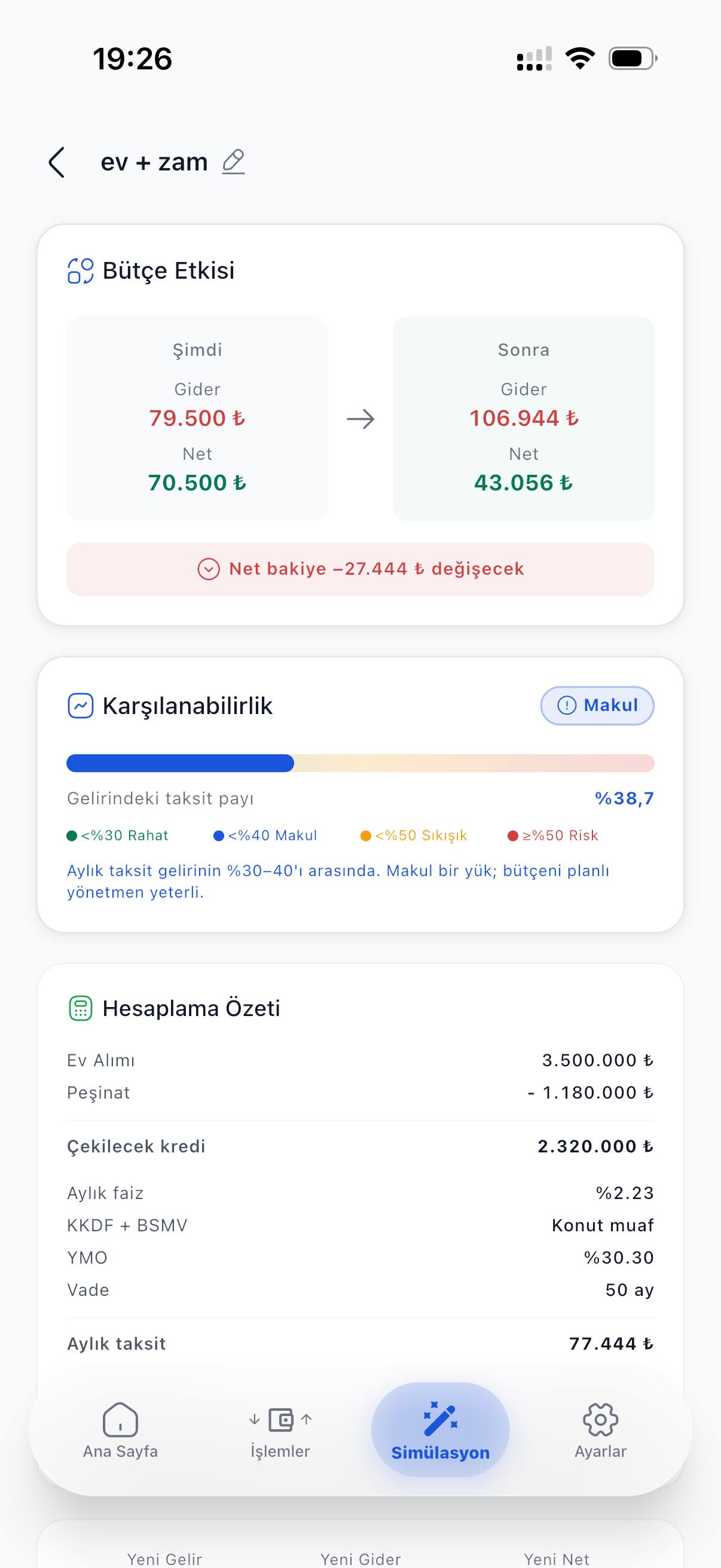
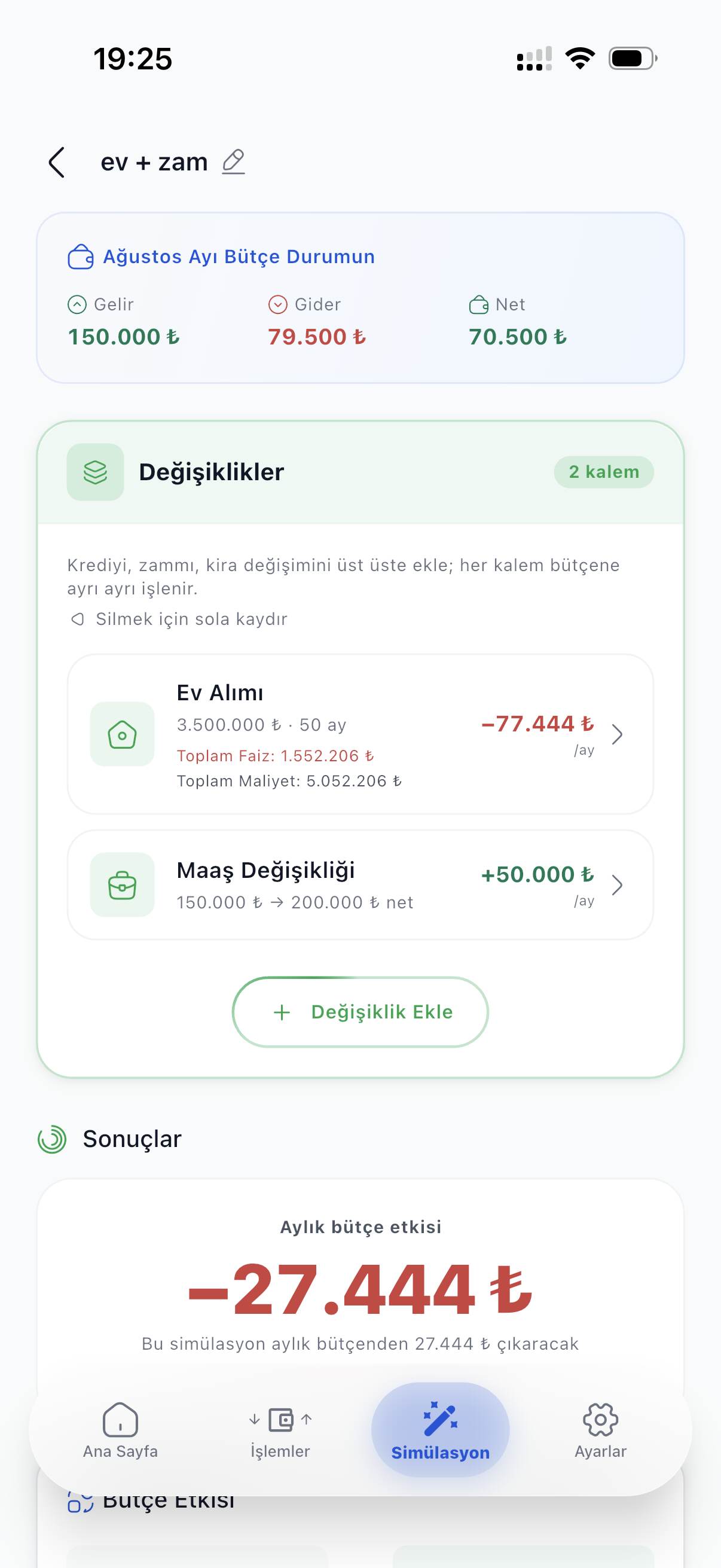
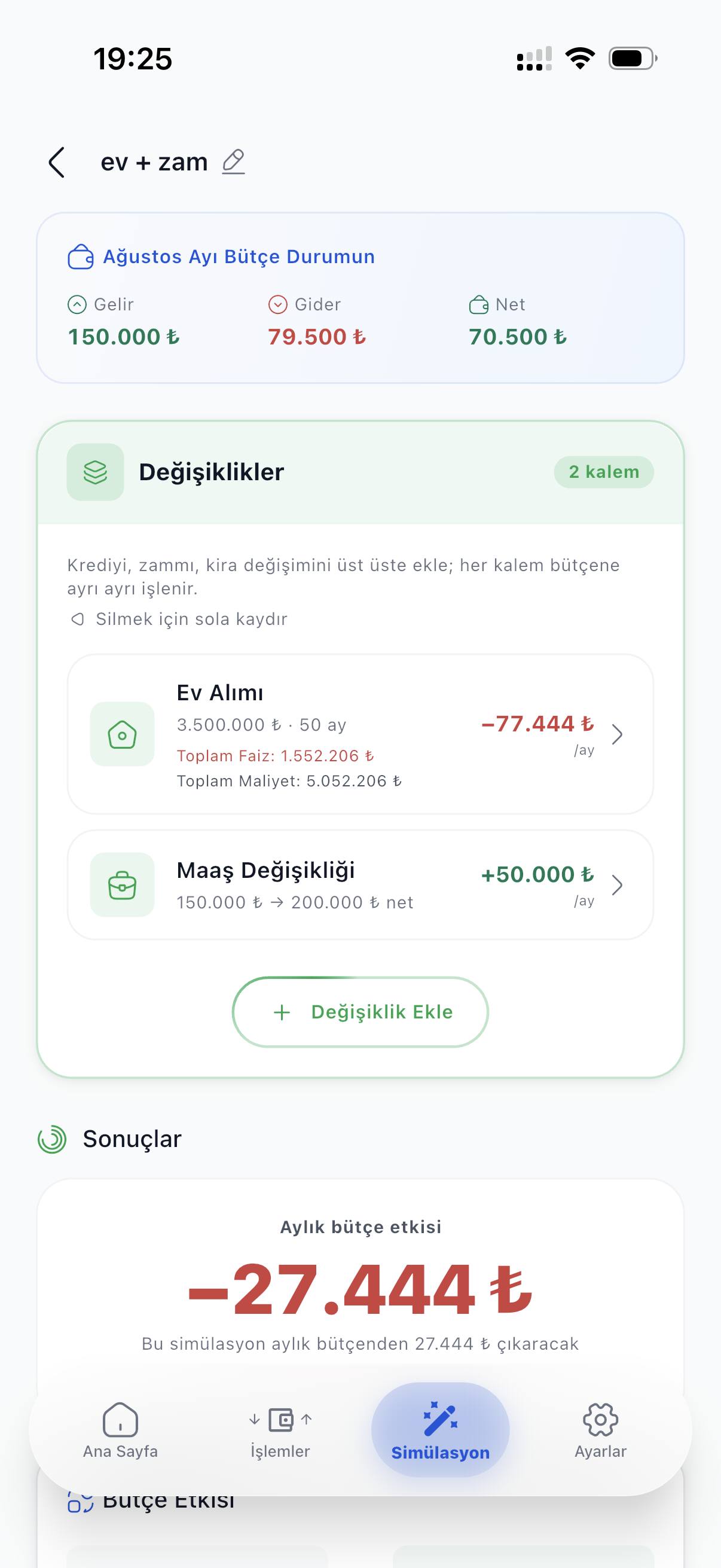
Simulation screen (Turkish UI): home purchase and salary change together, monthly budget effect −27,444 ₺.
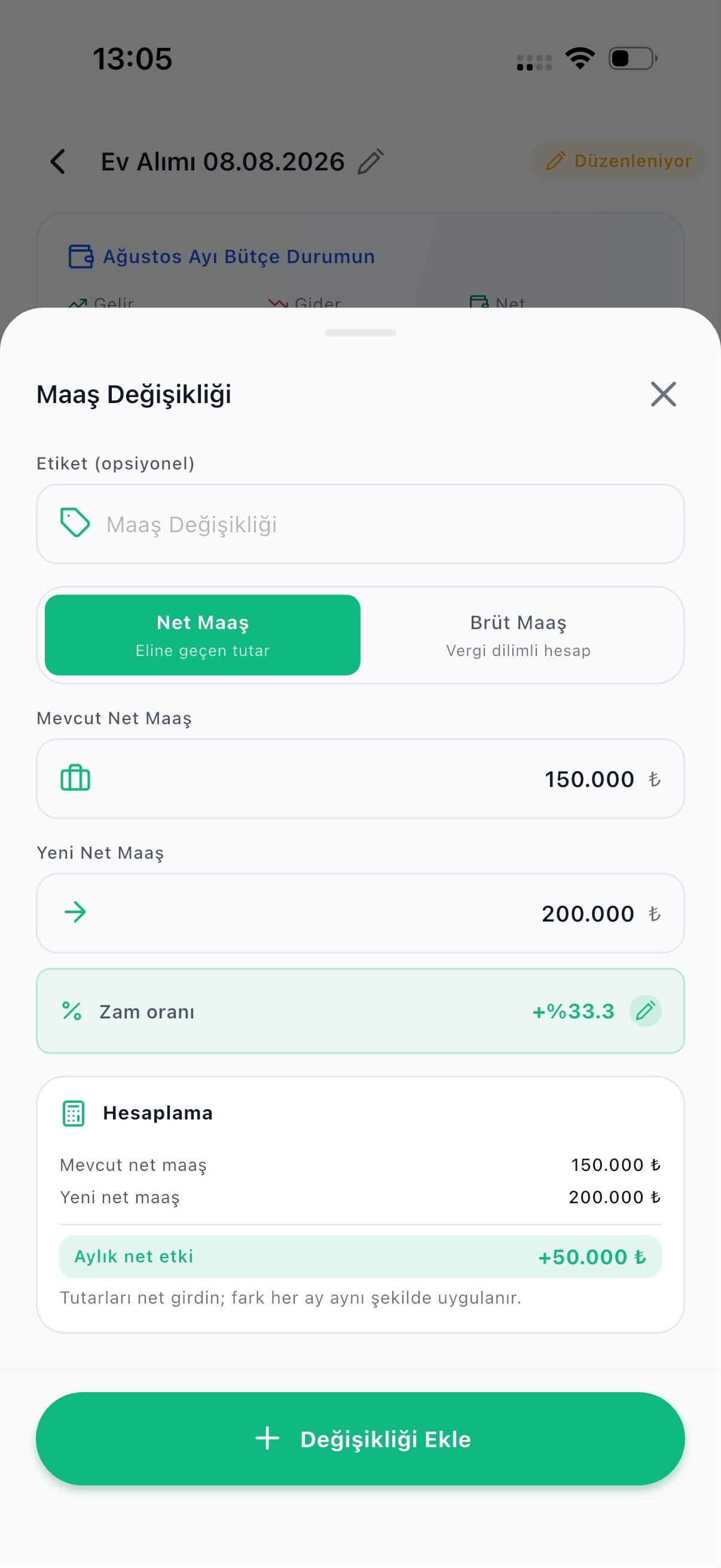
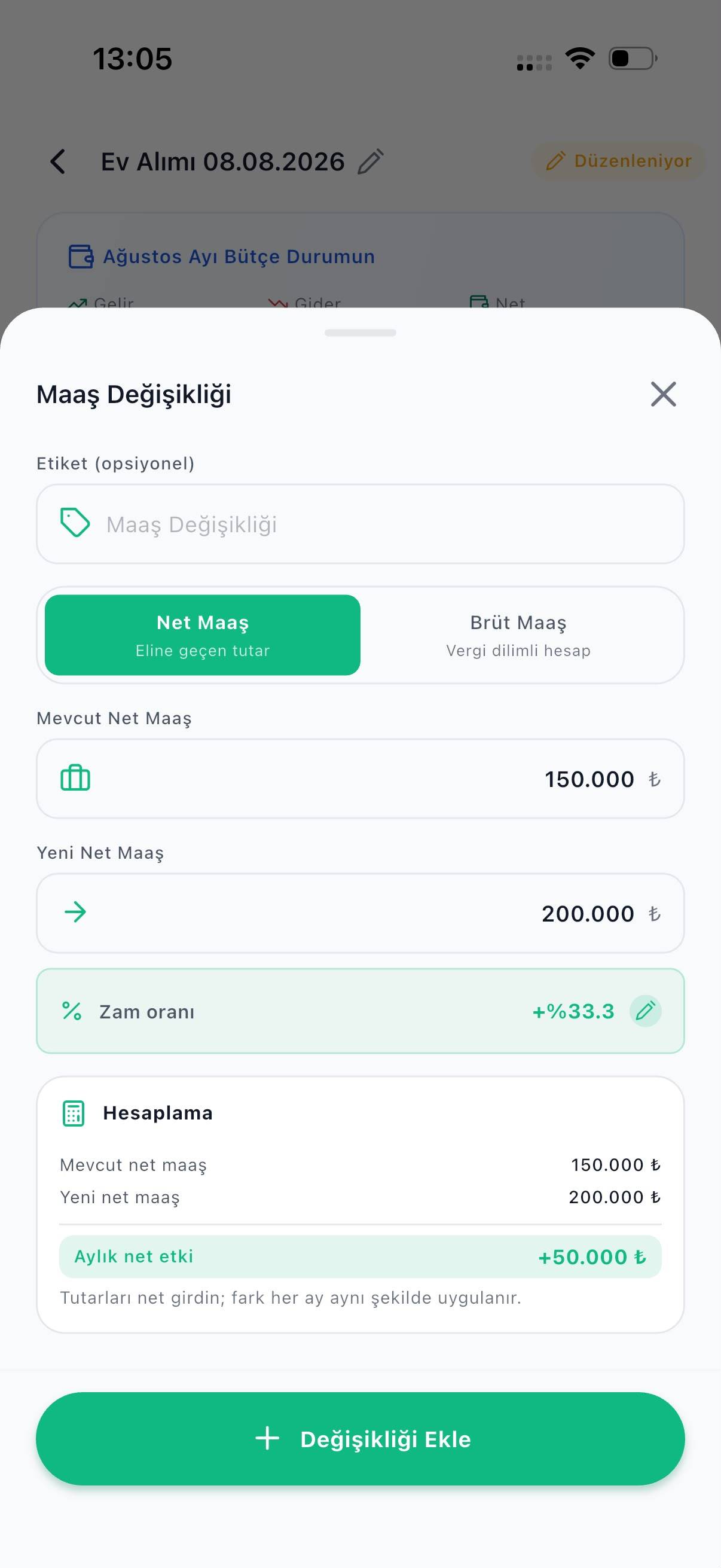
Salary change screen (Turkish UI): current and new net salary entered, monthly net effect +50,000 ₺.
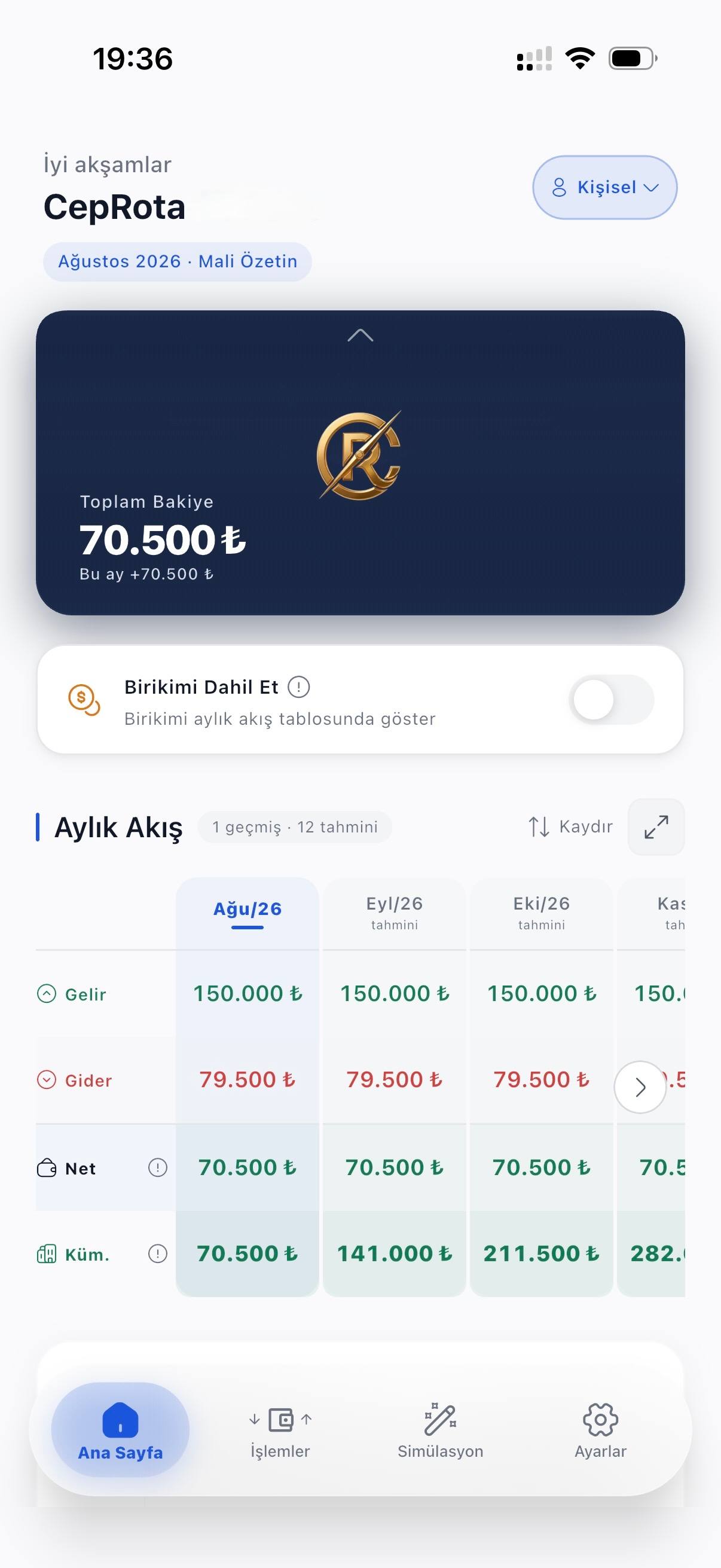
CepRota home screen (Turkish UI): 70,500 ₺ total balance and a monthly flow table with income, expense, net and cumulative savings forecasts for the coming months.
  • 13 ready-made calculators
  • Free the whole personal budget
  • Ad-free no banners, video or tracking
  • Offline works without internet

How it works

See your route in three steps

From setup to your first route in three steps.

  1. Step 1: Set up

    Enter your salary and regular expenses once. Setup takes a few minutes.

    You don’t re-enter regular items every month.

  2. Step 2: Track

    Follow your income and expenses through the month; you see where the money goes.

    Works without internet; syncs on its own once you are back online.

  3. Step 3: See your route

    Try the decision before you make it: it shows what it does to your budget months ahead.

    If you don’t like the outcome, you can drop the idea before committing.

Income & expense tracking

See where it goes, know where it’s heading.

Log your income and expenses one by one; watch how your savings grow over a month, a year or longer. Define regular items once and you never re-enter them — and a forecast of the coming months is already in front of you.
  • Monthly flow
  • Cumulative trend
  • Next 12 months
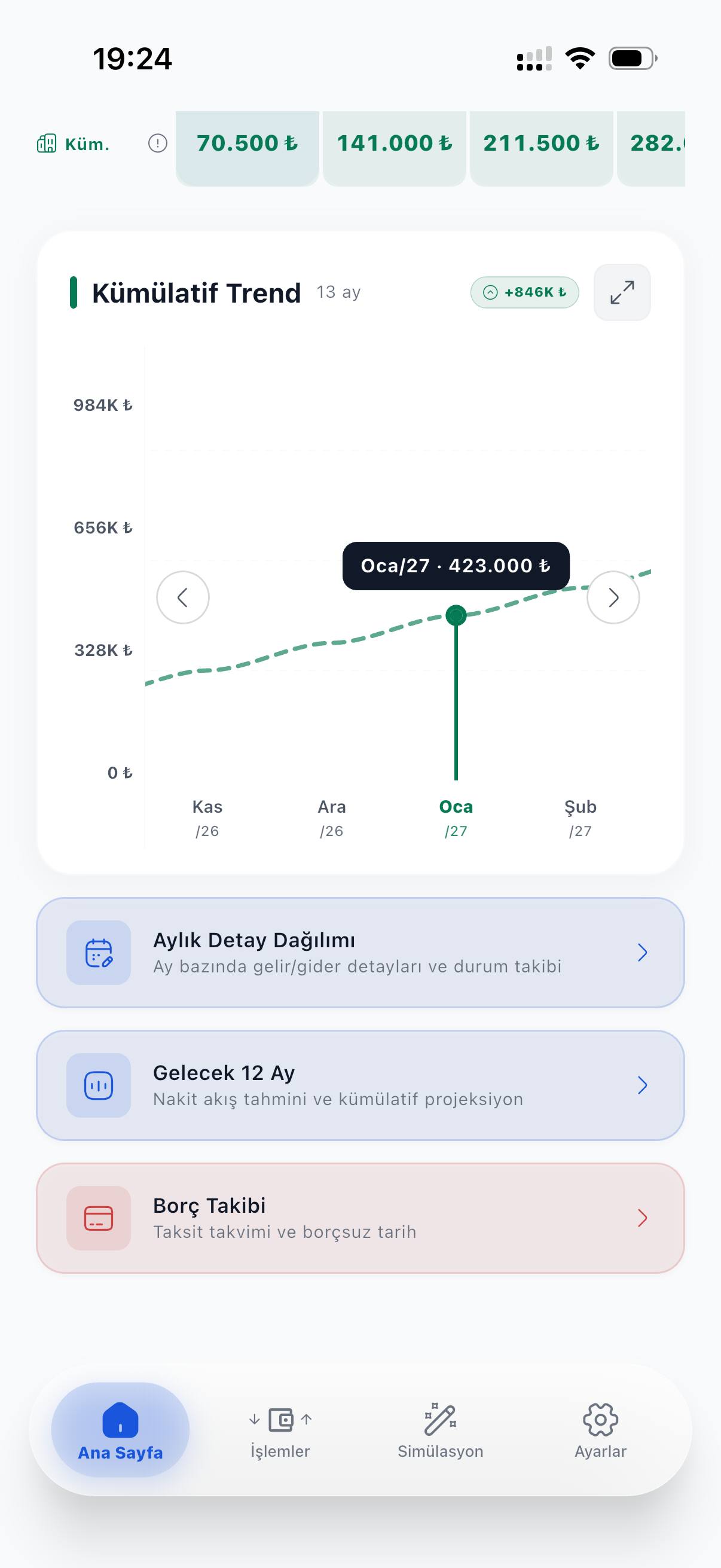
CepRota home screen (Turkish UI): a 13-month cumulative trend chart, a 423,000 ₺ savings forecast for January 2027 and links to monthly breakdowns.

Financial simulation

See the outcome before you borrow.

A mortgage, car or personal loan, a salary change, a rent increase — try the decision in the app first. You see the monthly instalment, the total cost and the monthly effect on your budget before you commit. Put two scenarios side by side and compare which one suits you.
  • Buying a home
  • Car
  • Personal loan
  • Salary change
  • Rent increase
Simulation screen (Turkish UI): a home purchase and a salary change stacked together, monthly budget effect calculated as −27,444 ₺.

The difference

See the outcome beforeyou decide.

Taking a loan, renting a home, buying a car or a change in salary — each leaves a mark on your budget that stretches over months. CepRota draws that mark in advance: it puts the version of you that decided next to the one that didn’t, and shows the gap at a glance.

Two-line chart: a dashed line shows the current trajectory, a solid line the trajectory after the decision. The lines start together and diverge over time; the gap is widest at month 24.
  1. Today
  2. 6 mo
  3. 12 mo
  4. 24 mo
  • If you decide
  • Your route today
  • The gap
Two futures of the same budget. CepRota draws both before you decide.

Savings goal

How far is the thing you want?

Write down the goal — a car, a home, a holiday. Based on what you save each month, you see month by month when you get there. Add the goal to your budget as an item and you follow how it moves alongside your other plans in one table.
  • Car
  • Home
  • Holiday
  • Any goal
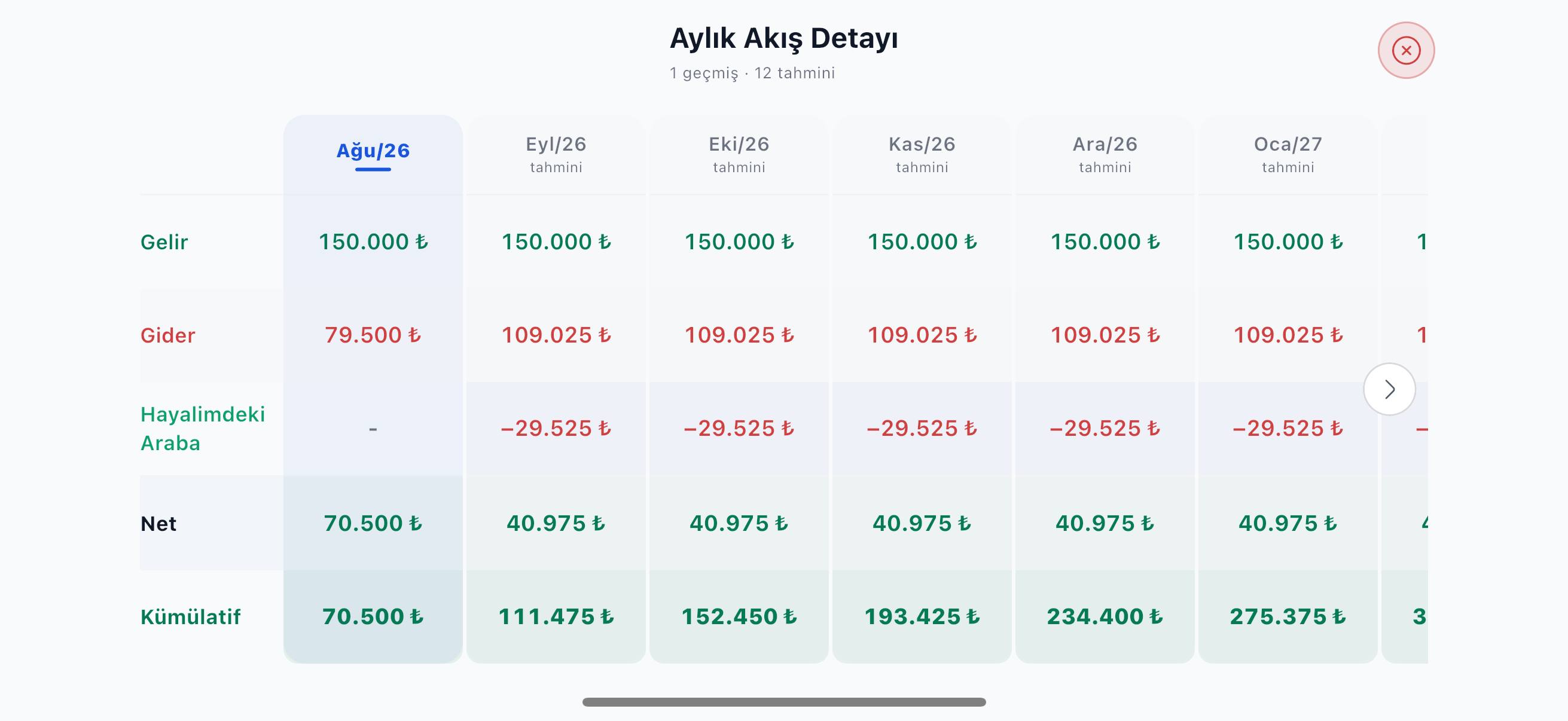
Monthly flow table in landscape (Turkish UI): the “dream car” goal entered as −29,525 ₺ a month and the cumulative savings row recalculated accordingly.

Shared ledger

Keep the budget together.

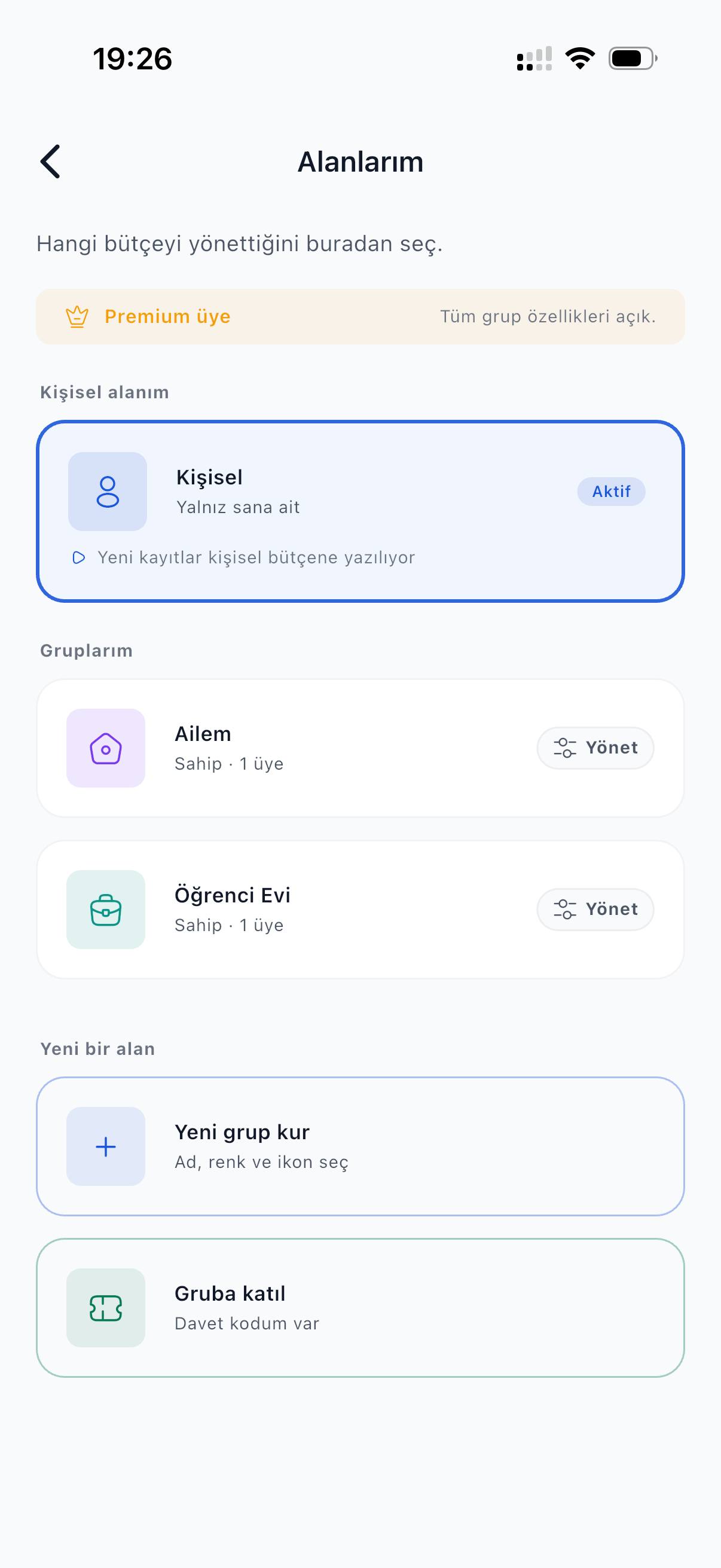
Set up a shared ledger with your family or flatmates; plan a holiday, a trip or a home purchase together. Everyone in the ledger sees who entered what. If someone invites you, you don’t need Premium to join — joining is free.
  • Family budget
  • Flatmates
  • Shared goals
Spaces screen (Turkish UI): the personal budget next to the “Family” and “Student flat” shared ledgers, and an entry for joining a ledger with an invite code.

Offline use

No internet? Still in control.

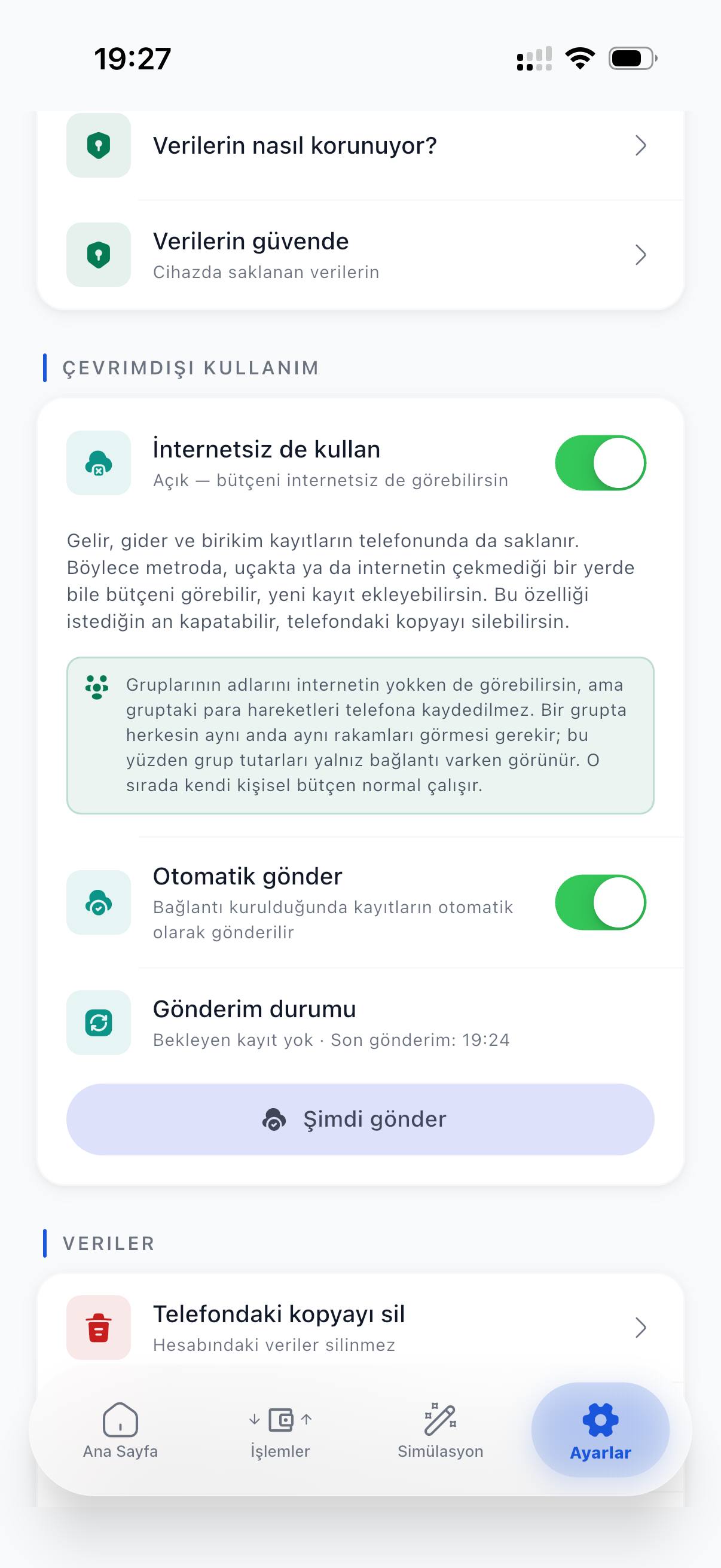
Your income, expense and savings entries are also stored on your phone. On the metro, on a plane or anywhere without signal you can view your budget and add new entries; once you are back online they are sent on their own. You can turn this off any time and delete the copy on the phone.
  • Metro
  • Plane
  • No signal
Settings screen (Turkish UI): “Use offline” and “Auto send” switches on; no pending entries and the time of the last send.

And there’s more

See your budget from every angle.

Beyond tracking and simulation, tools that make everyday decisions easier.

  • Ready-made calculators

    From mortgages, car and personal loans to deposits — 13 ready-made tools, based on current Turkish regulations.

  • Gross to net salary

    Enter your gross salary; see the net you take home month by month through the year.

  • Participation finance

    Compare interest-free home and car finance side by side with a conventional loan.

  • Goals and limits

    Set a savings goal and draw limits on spending categories.

  • Debt tracking

    Follow your instalments in one place; see the date you will be debt-free.

  • Cash-flow projection

    See the income, expense and net table of the coming months today.

Screens

Inside the app.

Unretouched, as they are — the screens you will find when you install. (Turkish interface shown.)
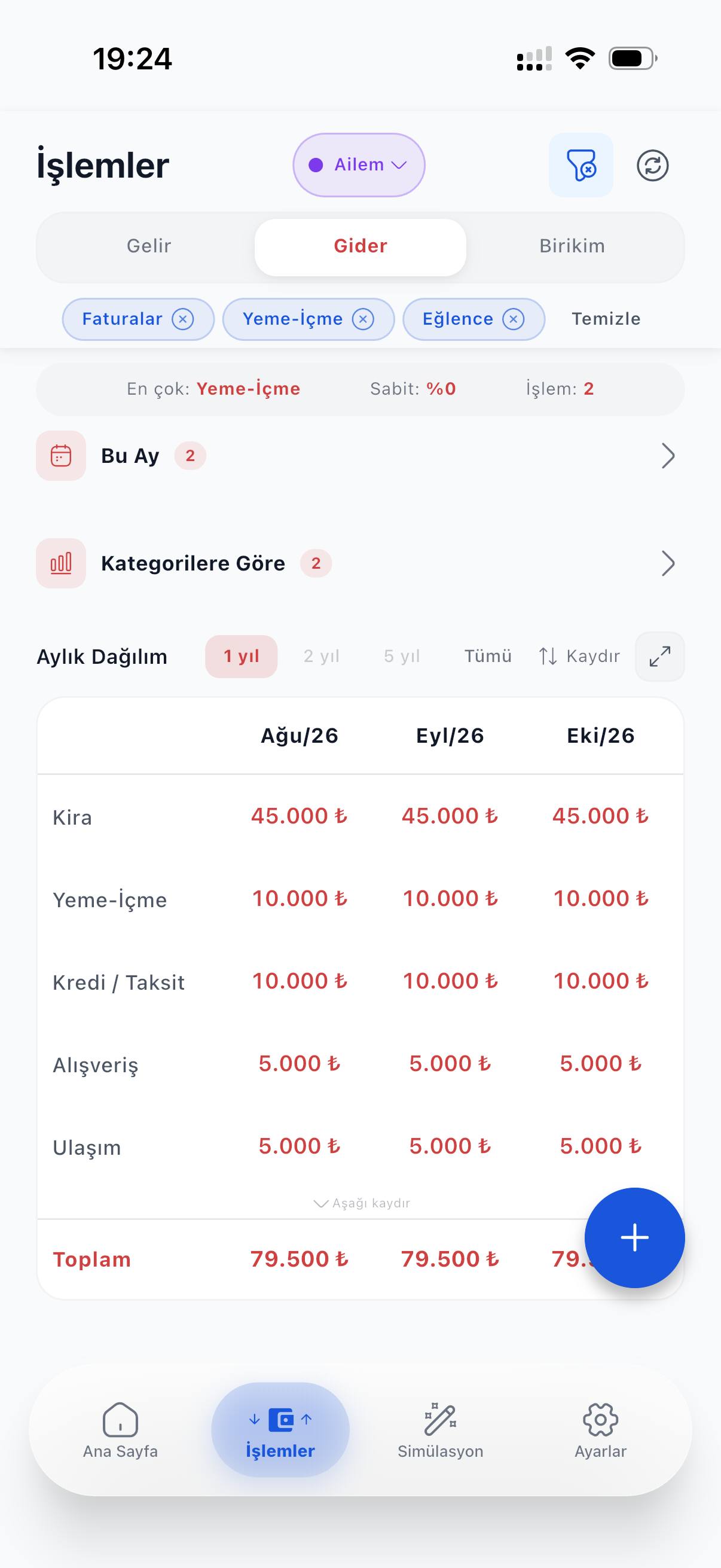
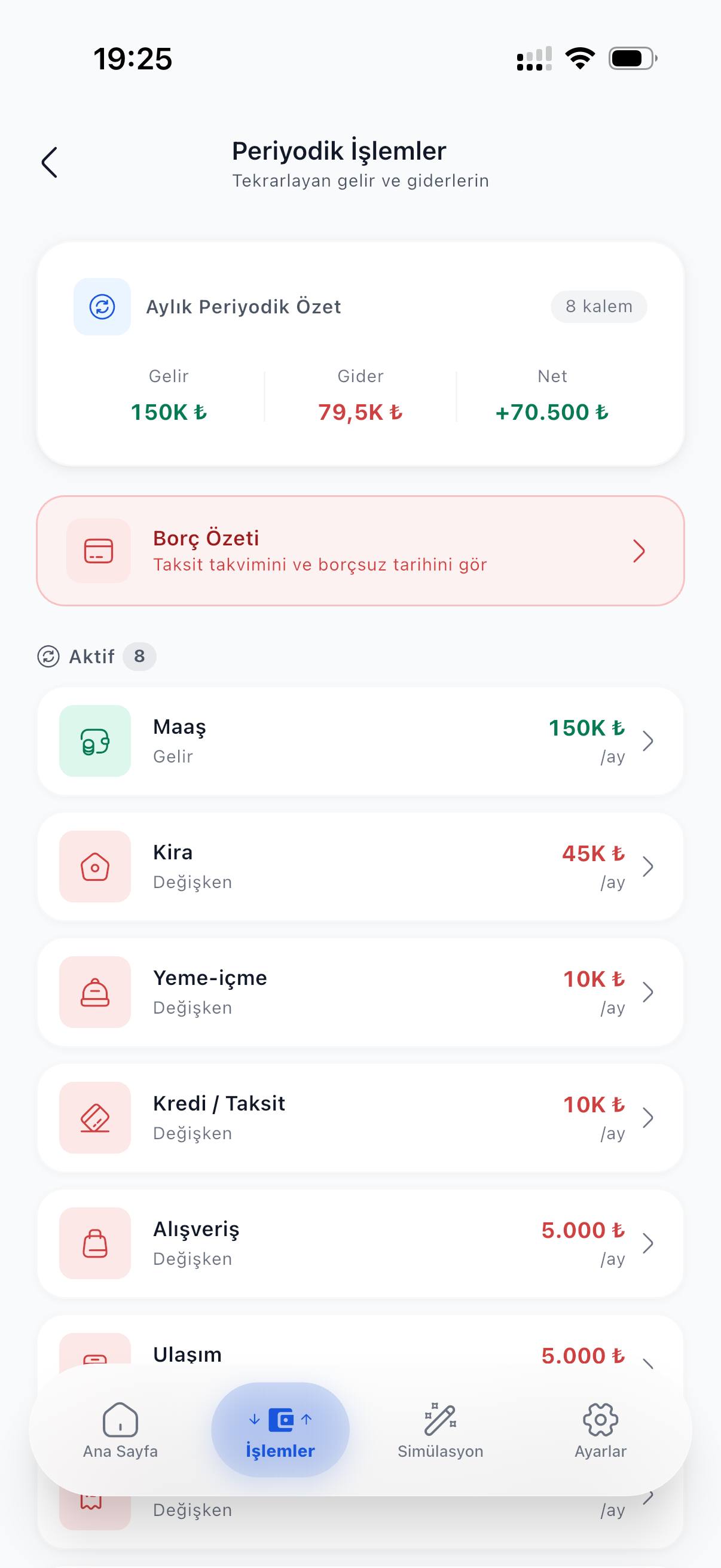
  • Home (Turkish UI): 70,500 ₺ total balance and the income, expense, net and cumulative savings table for the coming months.
    Home
  • Home (Turkish UI): 13-month cumulative trend chart and a savings forecast for January 2027.
    Cumulative trend
  • Transactions (Turkish UI): expense tab, category filters and a monthly breakdown of items such as rent, food and instalments.
    Transactions
  • Recurring items (Turkish UI): monthly income, expense and net summary, a debt summary card and recurring items such as salary and rent.
    Recurring items
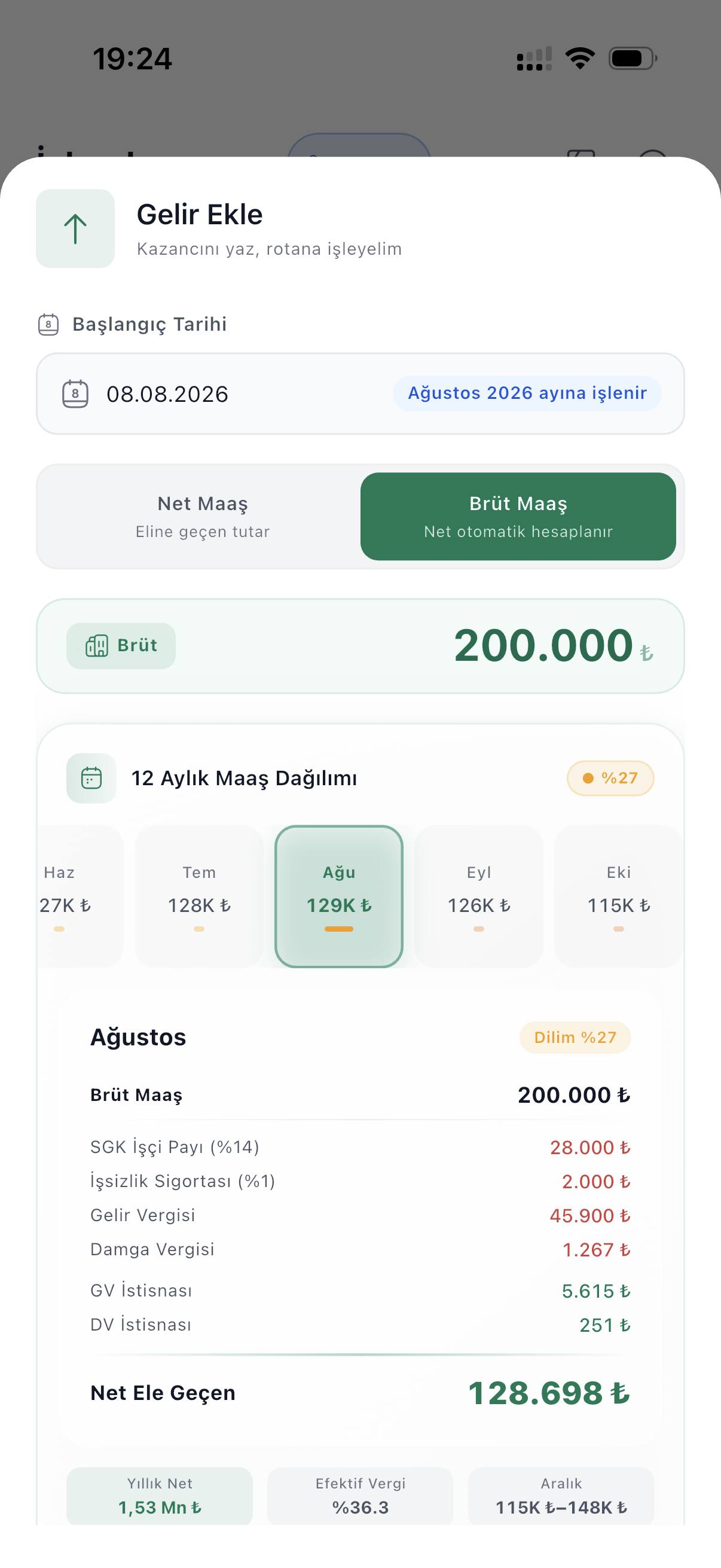
  • Add income (Turkish UI): 12-month breakdown for a 200,000 ₺ gross salary and the net take-home for August.
    Gross to net
  • Simulation (Turkish UI): home purchase and salary change together, monthly budget effect −27,444 ₺.
    Simulation
  • Simulation (Turkish UI): before/after expense and net comparison, instalment share of income 38.7% rated “reasonable”.
    Affordability
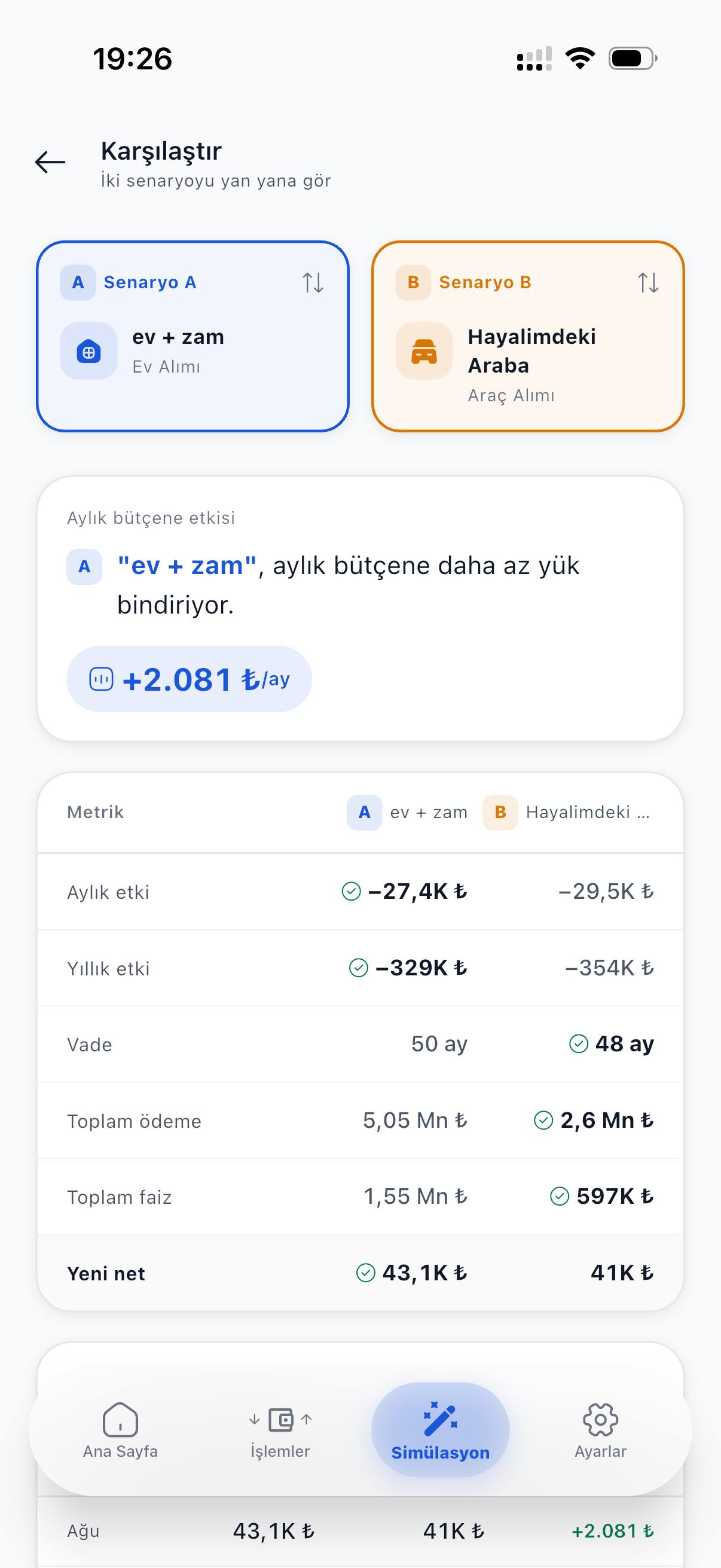
  • Comparison (Turkish UI): home purchase and car purchase side by side; monthly effect, term and total repayment.
    Compare scenarios
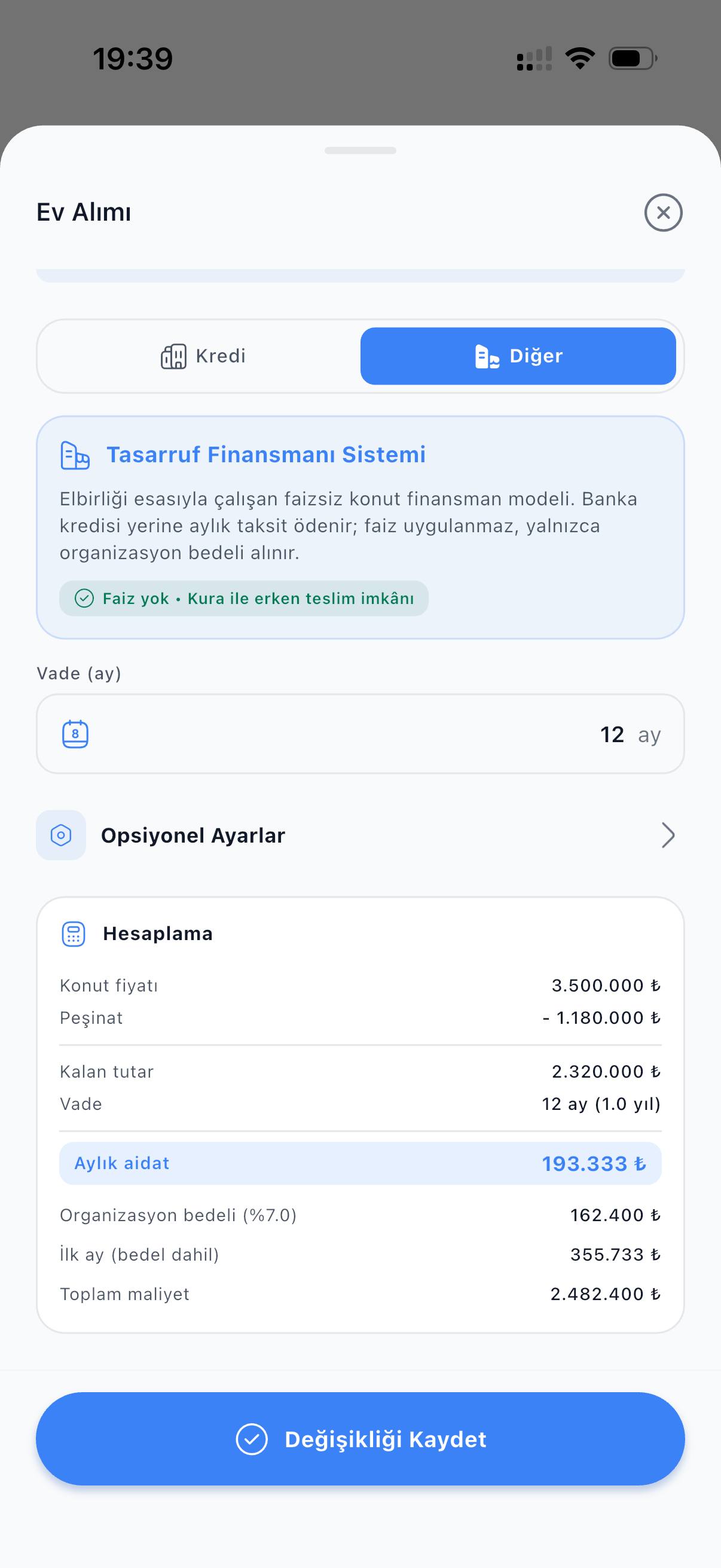
  • Home purchase (Turkish UI): participation finance option, 12-month term and the monthly contribution.
    Buying a home
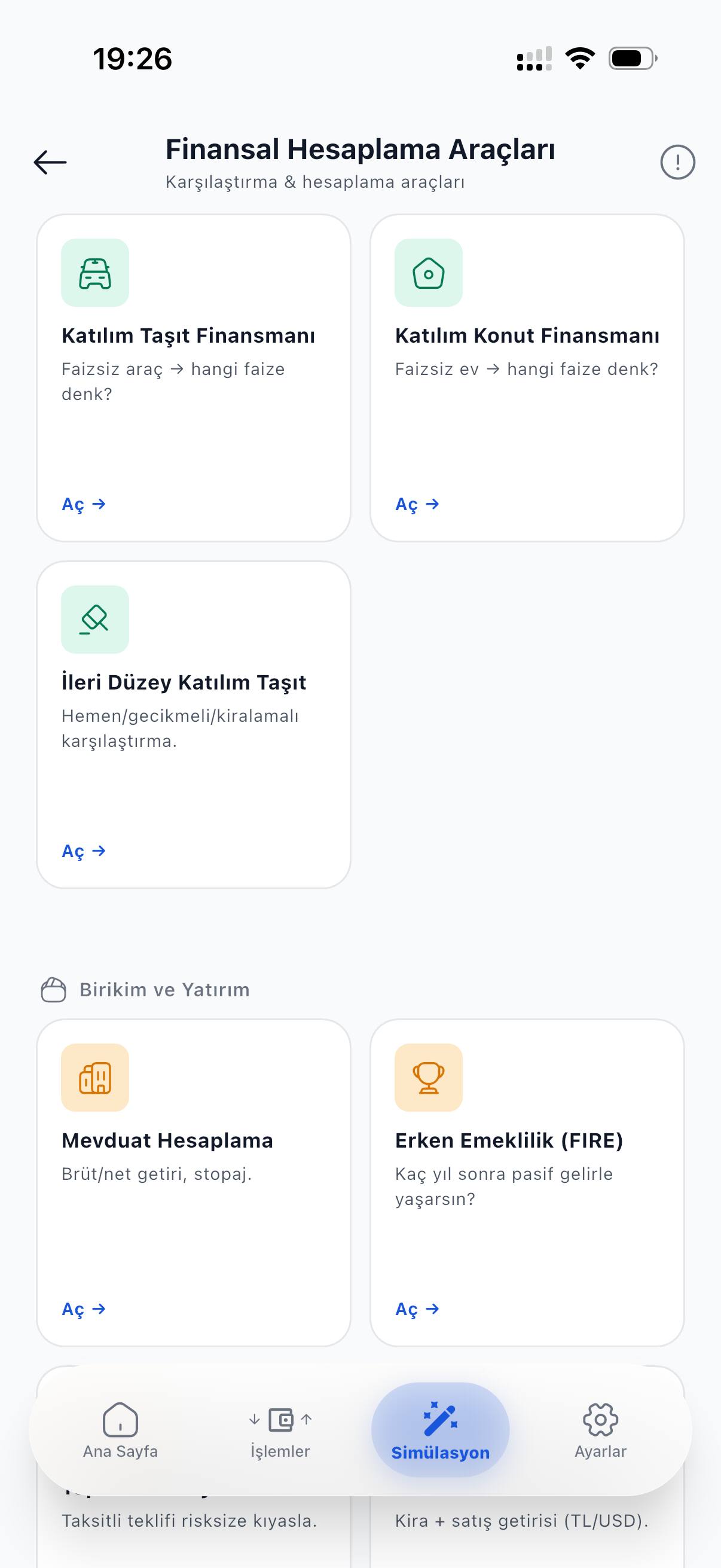
  • Financial calculators (Turkish UI): participation car and home finance, deposit and early-retirement cards.
    Calculators
  • Salary change (Turkish UI): current and new net salary entered, monthly net effect +50,000 ₺.
    Salary change
  • Spaces (Turkish UI): the personal budget next to the “Family” and “Student flat” shared ledgers and an invite-code entry.
    Shared ledgers
  • Settings (Turkish UI): “Use offline” and “Auto send” switches on.
    Offline

Worked examples

Real numbers,inputs written down.

Every example below comes from the app’s own calculation engine. We write the inputs so you can check the result yourself if you like.

Example · 75,000 ₺ gross salary How does your net salary change through the year?
Jan Monthly change vs. January Dec
Net salary in January
58,331 ₺
Net salary in December
52,085 ₺
Monthly gap in December −6,246 ₺

Gross stays the same; net does not. CepRota shows this at the start of the year.

Example · one month of income and expenses What is left at the end of the month?
  • Income 62,000 ₺
  • Expenses 47,500 ₺
Left at month end 14,500 ₺

You can see it mid-month too — no need to wait for the end.

Example · 250,000 ₺ goal · 8,500 ₺ a month When do you reach your goal?
at the end of month 12 %41
Saved in 12 months
102,000 ₺
Time left to goal
18 months
Goal reached month 30

You see month by month when you will get there.

Example · 1,000,000 ₺ mortgage · 120 months · 2.49% monthly What is the total repayment?
  • Principal 1,000,000 ₺
  • On top of principal 2,152,760 ₺
Monthly instalment
26,273 ₺
Total over 120 months
3,152,760 ₺
Total extra paid +2,152,760 ₺

You see the effect on your budget before you take the loan.

Example · 28,000 ₺ rent · 25% increase How much does a rent increase cost you?
Current rent 28,000 ₺
New rent 35,000 ₺
Monthly increase
+7,000 ₺
Yearly increase +84,000 ₺

See the effect before the increase comes up.

Example · a two-person shared ledger · one month Who entered what in the shared ledger?
  • You 14,200 ₺
  • Other member 9,800 ₺
Shared expenses total 24,000 ₺

Everyone in the ledger sees who entered what.

Our promise

What we don’t do

  • No bank linking

    We never access any of your accounts.

  • No ID number

    We don’t collect identity details.

  • No ads

    You won’t see ads on your screen.

  • No forced subscription

    The free version is not a timed trial.

Community

Follow us on Instagram

Updates and example scenarios are shared there.

Follow on Instagram @ceprotapp (opens in a new tab)

FAQ

Frequently asked questions.

Can’t find what you need? Check the support page or write to us.

Is CepRota free?

Yes. Income and expense tracking, simulation, calculators, offline use — the whole personal budget is free, and it is not a timed trial. Premium is only for creating a shared ledger; you don’t need Premium to join a ledger you are invited to.

Do I have to link my bank account?

No. CepRota never connects to a bank account; you enter your income and expenses yourself.

Does it ask for an ID number?

No. No identity number, ID photo or address is collected. An email, Google or Apple sign-in is enough for an account. What is processed is listed in the privacy notice (Turkish).

Does it work without internet?

Yes. You can view your personal budget and add new entries without internet; once you are back online they are sent on their own.

Will I get locked into a subscription?

No. There is no forced subscription; if you buy Premium you can cancel it any time from your App Store or Google Play account. Your personal budget stays free.

What happens if the ledger owner’s subscription ends?

The ledger is not deleted. Entries stay readable; only adding new entries stops. The owner is the one who unlocks it again.

Are the calculations based on Turkish rules?

Yes; salary, loan and participation-finance calculations follow current Turkish regulations. Results are an estimate, not financial or investment advice.

Can I delete my account?

Yes, in the app or by email. If you sign in again within 30 days the account comes back; after that your data is permanently deleted. Details: account deletion (Turkish).

Can I use the same account on iPhone and Android?

Yes. CepRota is on both stores; your entries belong to your account, so they are waiting on any device you sign in to.

Make your next decision with numbers.

The whole personal budget is free.

iOS and Android · Free · App Store 4+ · Google Play PEGI 3